Best Font Manager: Top Tools for Organizing Your Typography
If your font folder looks like final-fonts-v3-really-final, you are already at the point where a font manager pays for itself. The best font manager helps you preview type faster, activate only the fonts you need, and keep project libraries clean enough that you are not hunting through duplicates right before a deadline.
For most designers, the right pick depends less on which app has the longest feature list and more on where you work. Creative Cloud users need fast activation. Mac designers often care most about previews and app integrations. Windows-heavy teams usually need better tagging, syncing, and cleanup tools. Agencies care about licensing and shared libraries more than anything else.
This guide breaks down the best font manager options available right now, what each one is best at, and how to choose without overbuying.
What the best font manager should do
A serious font manager should help you:
preview fonts without dumping everything into your system font folder
organize libraries with collections, tags, or smart groups
activate fonts only when a project actually needs them
catch duplicates, missing versions, or bad files before they break a layout
separate personal, client, and team libraries cleanly
If a tool cannot do at least three of those well, it is probably a font browser, not a real font management system.
Best font manager picks at a glance
Tool | Platform | Best for | Why it stands out |
|---|---|---|---|
Adobe Fonts | Mac, Windows | Creative Cloud users | Fast activation inside the Adobe ecosystem |
RightFont | Mac | Professional design workflows | Auto-activation, smart tags, and deep app integrations |
Typeface | Mac | Designers who choose type visually | Excellent previews, metadata inspection, and variable font controls |
FontBase | Mac, Windows, Linux | Most users who want a free option | Free, cross-platform, and surprisingly capable |
MainType | Windows | Large Windows font libraries | Strong categorization, previews, syncing, and cleanup |
Monotype Connect | Team workflows | Agencies and brand teams | Shared libraries, governance, and licensing control |
Font Book | Mac | Light built-in management | Included with macOS and useful for smaller libraries |
1. Adobe Fonts: Best if you already live in Creative Cloud
Adobe Fonts is the easiest choice if most of your design work already happens inside Photoshop, Illustrator, or InDesign. Adobe's own help documentation notes that added fonts appear across desktop applications and are managed through Creative Cloud, which makes activation feel nearly invisible once you are inside the Adobe workflow.
That convenience is the entire selling point. You do not have to manually install and remove font files every time you switch projects. You browse, activate, and move on.
Where Adobe Fonts becomes less complete is third-party library management. If your daily work includes archived client fonts, purchased families from multiple foundries, or older local files you need to keep organized by project, Adobe Fonts is better treated as one part of your setup rather than your only font manager.
Best for: Designers who mostly work in Creative Cloud and want the least-friction option.
2. RightFont: Best professional font manager for Mac
RightFont is one of the strongest dedicated Mac font managers available now. The app is built specifically for macOS, supports unified search, tags, and smart tags, and leans hard into the day-to-day pain points professional designers actually have.
Its biggest advantage is workflow integration. RightFont supports auto-activation for missing fonts in major design apps and can change fonts directly inside supported tools. If you open documents across Adobe apps, Figma, Sketch, Affinity, or QuarkXPress, that integration saves time every week.
It also supports sharing libraries and tags through cloud drives, which makes it practical for freelancers moving between machines and for smaller teams that need a shared setup without jumping straight to enterprise software.
Best for: Mac users who want a purpose-built professional font manager with strong activation and app support.
3. Typeface: Best Mac font manager for visual browsing
Typeface takes a slightly different approach from RightFont. It is still a serious Mac font manager, but it shines most when browsing, comparing, and inspecting fonts is part of your creative process rather than just an administrative task.
The official site emphasizes live preview customization, detailed metadata views, OpenType inspection, variable font controls, Unicode browsing, and even body-text layout previews. That makes Typeface especially good for editorial work, branding, and any workflow where you need to study how a font behaves before committing to it.
If RightFont feels like the best tool for active production workflows, Typeface feels like the best tool for designers who want their font manager to double as a type exploration environment.
Best for: Mac designers who care as much about choosing type well as they do about organizing it.
4. FontBase: Best free font manager for most people
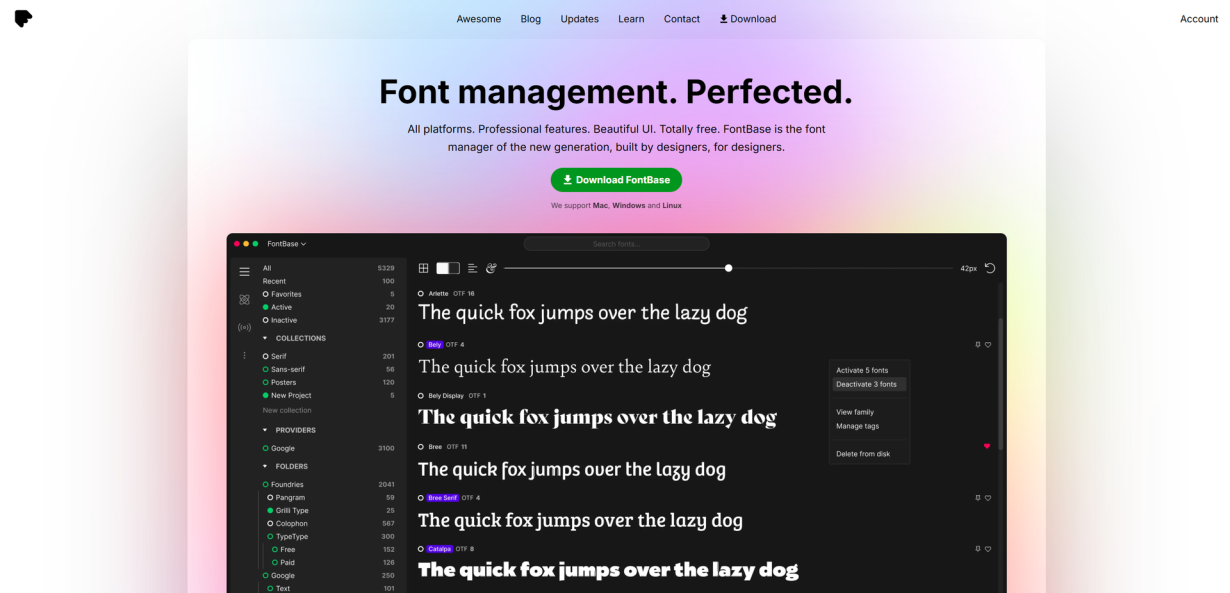
FontBase is the easiest recommendation for anyone searching for the best free font manager. It supports Mac, Windows, and Linux, and its core pitch is still unusually strong: professional features, cross-platform support, and no upfront cost.
What makes FontBase useful is that it covers the basics well without feeling stripped down. You get collections, watched folders, OpenType feature support, search, activation tools, and Google Fonts access inside the app. For freelancers, students, and mixed-OS teams, that is a very practical mix.
It is also a smart starting point if you are not yet sure what kind of font workflow you need. A lot of people do not need enterprise licensing dashboards or hyper-specialized activation rules. They just need a clean way to browse, group, and turn fonts on when necessary. FontBase handles that well.
Best for: Designers who want a capable font manager without paying first.
5. MainType: Best font manager for Windows power users
MainType is one of the clearest current answers for Windows users. High-Logic positions it as a full Windows font manager and font viewer, and the product page backs that up with deep organization, preview, and maintenance features.
MainType is especially strong if your library is large or messy. It supports tags, ratings, groups, Unicode previews, font comparison, duplicate cleanup, backup and restore, and folder synchronization for teams or multi-machine setups. It also highlights support for variable fonts and OpenType layout features, which matters if you work with more modern families.
This is the pick for designers who want more control than a lightweight browser offers and who work primarily on Windows.
Best for: Windows users managing large libraries, multiple projects, or older collections that need cleanup.
6. Monotype Connect: Best font manager for teams and licensing control
Monotype Connect is not aimed at solo designers first. It is aimed at organizations that need to manage, license, govern, and deploy fonts across teams, regions, and production environments.
That distinction matters. If your real problem is not "How do I preview fonts faster?" but "How do we keep three design teams, two agencies, and a brand library compliant without spreadsheet chaos?" then Monotype Connect belongs on your shortlist. Monotype highlights shared libraries, smart search and tagging, workflow integrations, project risk scanning, license management, and auto-activation inside Adobe apps.
For a solo designer, that may be overkill. For agencies, in-house brand teams, and larger creative operations, it solves a different class of problem than most personal font managers do.
Best for: Teams that need shared libraries, permissions, and licensing visibility as much as they need font browsing.
7. Font Book: Best built-in option for light Mac workflows
If you use a Mac and your needs are modest, Font Book may be enough. Apple's documentation shows that you can create libraries for project-specific fonts and Smart Collections based on criteria like design style or family.
That makes Font Book a legitimate no-cost starting point, especially if your collection is still manageable and you do not need advanced app integrations or team features. It will not replace a dedicated pro tool for heavier workflows, but it is much more useful than many designers give it credit for.
Best for: Mac users who want simple built-in organization before adding another paid app to the stack.
How to choose the best font manager for your workflow
The easiest way to decide is to match the tool to the actual problem you have:
If your world is mostly Adobe and you want the smoothest activation path, start with Adobe Fonts.
If you are on Mac and fonts are part of your daily billable work, choose RightFont or Typeface.
If you want the best free font manager, start with FontBase.
If you are on Windows and need stronger control over a large library, choose MainType.
If multiple designers share brand libraries or licensing is a real business risk, use Monotype Connect.
If your needs are light and you already use macOS, Font Book may be enough.
The main tradeoff is simple. Personal tools optimize for speed and clarity. Team tools optimize for control and compliance. Most designers make a better decision once they are honest about which side of that line they are on.
A few habits that matter more than the software
Even the best font manager gets messy if your library habits are chaotic. A few simple rules help more than people expect:
Keep a working library and an archive library.
Name client collections by project, not by mood.
Maintain a short shortlist of go-to body, display, and UI fonts.
Back up licensed font files outside any single app.
A font manager should reduce friction, not become the only place your typography assets live.
Final verdict
For most people, FontBase is the best font manager to start with because it is free, cross-platform, and strong enough for real work. If you are Mac-first and need pro workflow integration, RightFont is the stronger production pick, while Typeface is the better visual exploration pick. If you are on Windows, MainType is the most practical dedicated option in this list. If you manage fonts as part of a team operation, Monotype Connect is built for that job in a way personal tools are not.
The wrong choice is usually not picking a bad app. It is forcing a lightweight personal tool to do enterprise work, or paying for enterprise software when all you really needed was a cleaner way to browse 300 fonts.
FAQ
What is the best free font manager?
For most users, FontBase is the best free font manager because it supports Mac, Windows, and Linux while still offering collections, watched folders, Google Fonts access, and activation features.
Do I need a font manager if I already use Adobe Fonts?
Maybe not. If most of your font library comes from Adobe and your work stays inside Creative Cloud, Adobe Fonts may be enough. If you regularly handle purchased, archived, or client-supplied font files, a dedicated font manager gives you better organization.
What is the best font manager for Mac?
RightFont is the strongest all-around professional choice for Mac. Typeface is an excellent alternative if live previews, font inspection, and visual exploration are your top priorities. Font Book is fine for lighter built-in use.
What is the best font manager for Windows?
MainType is one of the strongest current Windows options if you need large-library organization, tags, previews, cleanup tools, and synchronization features.
Linh Nguyen
Graphic Designer
Passionate Graphic Designer | Specializing in Illustration Design | Bringing Captivating Visuals to Life