How to Choose the Right font?
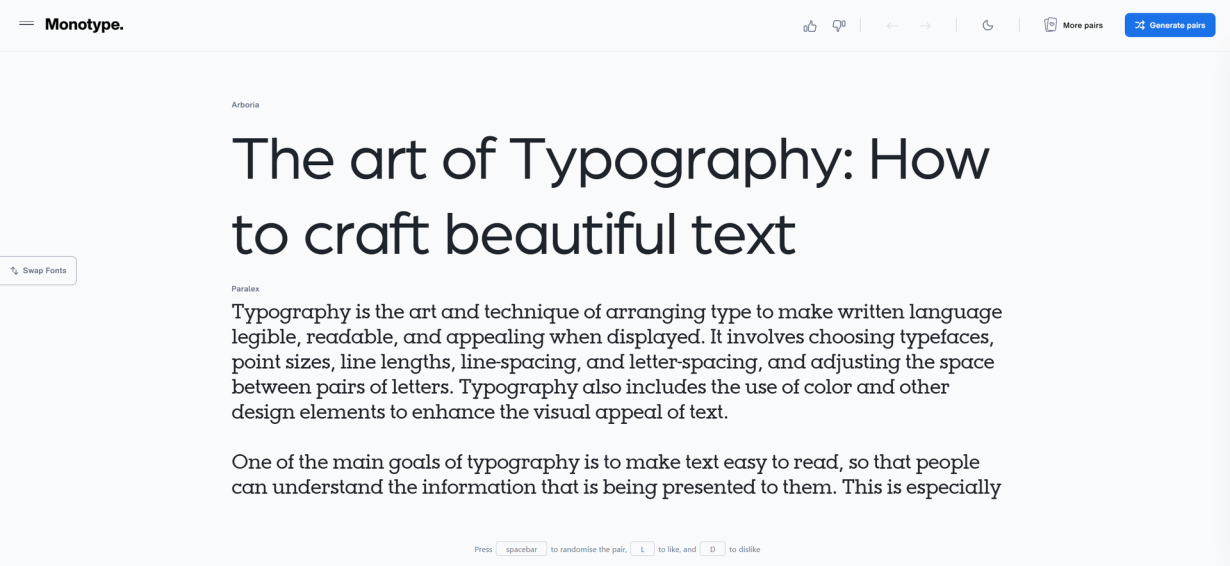
The font you choose speaks before a single word is read. It's the visual voice of your design, setting the mood and establishing personality before your audience processes any actual content. Getting it right matters enormously—while getting it wrong can undermine even the most brilliant content.
Font selection isn't about following trends or picking whatever looks prettiest. It's about understanding how type communicates and matching that understanding to your specific goals. This guide walks through a practical process for making confident font choices that serve your design and your audience.
Start with Purpose, Not Aesthetics
Before exploring any typefaces, define what your design needs to accomplish. A financial report requires different typographic treatment than a music festival poster. The context shapes everything that follows.
Consider your audience first. Who will see this design, and what expectations do they bring? A luxury brand needs different typography than a children's app. Legal documents demand clarity that creative projects can sacrifice for expression. Understanding these constraints narrows your options productively.
The medium matters too. Screen typography behaves differently from print. Long-form reading requires different considerations than headlines or identity systems. Some fonts excel in one context and fail in another. Knowing where your design will live helps eliminate options that won't work.
Gather references before committing to anything. Browse design platforms, note typefaces that catch your eye, and collect screenshots of work that resonates. This isn't about copying—it's about training your eye and building a mental palette of possibilities. Pinterest, Dribbble, and Typewolf offer endless inspiration. Pay attention to why certain choices work in context.
Choose Your Primary Font First
With context established, select your primary typeface. This is your headline font, your attention-grabber, your design's first impression. It should be distinctive enough to establish personality while remaining legible at various sizes.
The primary font carries your design's emotional weight. A geometric sans-serif communicates different feelings than a Didone serif. A display typeface with personality might overwhelm body text but excel as a headline. Match your font's personality to your project's mood.
Legibility deserves special attention for primary fonts used at larger sizes. While decorative typefaces work beautifully in headlines, they often fail when scaled down. Test your choice at the sizes you'll actually use. What looks distinctive in a type specimen might become illegible at practical sizes.
Don't rush this decision. Primary typography sets the direction for everything else. Review dozens of options before committing. The time invested here pays dividends throughout the rest of your process.
Build Contrast with Your Secondary Font
Once your primary font is set, your secondary font provides balance and functionality. This typeface handles body text, supporting information, and the workhorses of your design. It should complement your primary choice without competing for attention.
Contrast is the goal—similar fonts create visual confusion rather than visual interest. When primary and secondary typefaces look too alike, they create a liminal space where nothing feels intentional. The differences between your fonts should feel deliberate and productive.
Think of your primary font as your design's voice and your secondary font as its words. The voice carries personality; the words communicate content. Both matter, but they serve different functions.
Body text readability often dictates secondary font choice. Since readers encounter secondary typography more frequently and in longer passages, legibility becomes paramount. Test your secondary font with actual content at realistic sizes before committing.
Pair Fonts with Intention
Font pairing works best when you understand what makes fonts compatible or conflicting. Several approaches create effective combinations.
Pair Opposites
Contrasting font classifications often work well. A modern sans-serif headline pairs naturally with a humanist serif body font. The visual difference creates hierarchy while the humanist qualities keep body text comfortable for extended reading. This classic combination appears throughout professional design for good reason—it works reliably.
Geometric and organic shapes create similar contrast. A geometric sans-serif brings structure and precision. Pairing it with an organic or humanist typeface adds warmth that pure geometry might lack. The combination feels considered rather than default.
Vary Weight and Width
Sometimes the most effective pairings come from the same typeface family. Using a bold weight for headlines and a regular weight for body text creates consistency with clear hierarchy. This approach simplifies your design system while maintaining visual interest.
Varying width works similarly. A condensed headline font paired with a regular width body font creates distinction without introducing an entirely different typeface. This technique works particularly well for projects requiring a unified, cohesive feel.
Match Mood, Not Style
Fonts from different classifications can share emotional qualities that create compatibility. A quirky display serif might pair beautifully with a quirky sans-serif if both share similar personalities. The visual difference provides contrast while emotional similarity provides harmony.
This approach requires more refined judgment but produces distinctive results. It allows you to break from predictable combinations while maintaining coherence.
Consider the Details
Beyond broad classifications, specific characteristics influence how fonts work together.
Width and Proportion
Font width dramatically affects overall design feel. Condensed fonts pack information tightly and feel efficient and modern. Extended fonts feel friendly and open. Mixing widths intentionally creates visual interest and helps establish hierarchy.
Pairing a condensed headline with a regular body font creates immediate distinction. The width difference does the heavy lifting, allowing you to focus other pairing considerations elsewhere.
X-Height and Proportion
Fonts with similar x-heights tend to look harmonious together, even when from different classifications. The proportion of lowercase letters to uppercase creates visual rhythm that readers perceive subconsciously.
Some font families offer optical sizes designed for specific contexts. A font optimized for body text might differ from its display version despite sharing the same name. These subtle differences affect how fonts interact.
Historical Context
Fonts carry history. A transitional serif and a modern sans-serif both emerged from specific design traditions. Those traditions influence how the fonts feel individually and together. Understanding a bit about type history helps make intuitive pairing decisions.
Humanist typefaces share design principles from hand-lettering. Geometric sans-serifs emerged from modernist movements. These historical contexts create compatible design philosophies that translate to visual harmony.
Limit Your Typeface Palette
Resist the temptation to use many fonts. Each additional typeface dilutes your visual identity and increases cognitive load for readers. Most professional projects succeed with two typefaces; three maximum creates sufficient variety without overwhelming.
Using fewer fonts forces creative constraint. Instead of relying on different typefaces for variety, explore the full range of one font. Weight, size, spacing, and color create variation while maintaining coherence.
Professional design often uses a single typeface family with strategic variation. Bold weights handle headlines. Light weights create elegant touches. Italics add emphasis. This economy of typefaces creates sophisticated, unified designs.
When tempted to add a third font, ask whether existing typography can accomplish the goal. Usually, it can with thoughtful treatment.
Test in Context
Never select fonts in isolation. Type specimens and specimen books show fonts at their best but miss practical context. Test your choices with actual content, at realistic sizes, in realistic layouts.
Print proofs reveal things screens miss. Fonts that look identical on显示器 might differ dramatically in print. If your project involves print production, test with physical output early in the process.
Consider how your typography handles real content, not lorem ipsum. The way fonts handle specific letters, common words, and your particular content reveals practical limitations. Some fonts surprise you negatively once placed in context.
Test across devices and environments if your design is digital. What looks perfect on your Retina display might struggle on standard monitors. Color backgrounds affect readability. These practical considerations matter enormously in real application.
The Role of Readability
Readability isn't just about choosing a legible font—it's about how that font performs in your specific context. A font that's perfectly readable in a novel might fail in a dashboard interface. Understanding these contextual requirements helps you choose more effectively.
Body text readability depends on several factors. X-height affects how large text appears at small sizes. Larger x-heights generally improve readability in small sizes because they create more visual weight. Counter shapes—those enclosed spaces in letters like "e" and "o"—also influence readability, particularly at smaller sizes.
Line length impacts readability significantly. Fonts with comfortable letter spacing work better at wider line lengths. Some fonts tire readers faster than others when set in long passages. Testing with actual reading scenarios reveals these practical considerations that type specimens can't capture.
Contrast between text and background matters more than most designers realize. Insufficient contrast causes eye strain regardless of how excellent your font choice might be. White text on light backgrounds creates reading challenges. Dark text on dark backgrounds compounds problems. Ensure your combinations meet accessibility standards, not just aesthetic preferences.
Typography for Different Media
Digital and print typography share fundamentals but diverge in important practical ways. Understanding these differences prevents costly mistakes.
Screen Typography
Screen rendering has improved dramatically, but challenges remain. Fonts designed specifically for screens often perform better than adaptations from print. Screen-optimized fonts account for lower resolution and the way pixels render curves and diagonals.
Consider how your fonts render across browsers and operating systems. The same font can appear subtly different on Windows versus Mac, on Chrome versus Safari. These differences accumulate, particularly in professional work where precision matters.
Responsive design introduces additional complexity. Fonts that work beautifully at desktop sizes might struggle at mobile sizes. Consider how your typography scales and whether legibility holds across breakpoints. Some fonts maintain their character at small sizes; others lose essential qualities.
Print Typography
Print offers higher resolution but introduces different constraints. Paper stock affects ink absorption and consequently how type appears. Coated paper produces sharper edges; uncoated paper allows slight ink spread that can soften details.
Consider how your fonts perform at your intended print sizes. Text fonts optimized for 10-point settings might not work at display sizes. The reverse is also true—display fonts often fail at body text sizes.
Color printing introduces variables like dot gain and registration. Black text might appear slightly differently than expected. Test prints reveal these practical issues before final production.
Common Mistakes to Avoid
Learning from others' mistakes accelerates your development. Several common errors appear repeatedly in design work.
Mixing Too Many Fonts
The most frequent typography mistake involves using too many typefaces. Each additional font dilutes your visual identity. Readers experience this as visual noise rather than intentional design. Restrain yourself to two fonts, maximum three. This constraint forces creative solutions rather than relying on novelty.
Ignoring Hierarchy
Without clear hierarchy, readers struggle to understand content organization. Your typography should immediately communicate what matters most. Headlines need visual priority over body text. Emphasis needs to be visually distinct. When everything competes for attention, nothing stands out.
Following Trends Blindly
Trend-chasing leads to dated designs. What feels contemporary quickly becomes yesterday's aesthetic. Instead, understand why certain choices work and apply those principles. The best designers create timeless work by understanding fundamentals rather than following fashion.
Neglecting White Space
Typography exists in relationship to space around it. Cramped layouts undermine even excellent font choices. Generous white space lets typography breathe. It creates luxury and clarity. Don't crowd your type—give it room to function effectively.
Building Your Font Library
Professional designers develop curated font collections over time. Building yours intentionally accelerates your workflow.
Start with versatile foundations. A few excellent neutral fonts handle most projects efficiently. These workhorses should perform reliably across contexts. Then add specialty fonts for specific needs—a distinctive display face, a readable serif for long-form content, a quirky option for appropriate moments.
Quality matters more than quantity. One excellent font serves better than five mediocre ones. Invest in well-designed typefaces from reputable foundries. The investment pays through consistent quality and proper licensing.
Organize your library thoughtfully. Categories might include serifs, sans-serifs, display faces, monospace fonts, and scripts. Tag fonts by mood or use case for easier discovery. A well-organized library makes selection faster and more intentional.
Conclusion
Font selection improves with practice and attention. Each project teaches you more about what works and why. Build your judgment by studying typography you admire and understanding why specific choices succeed.
Remember that rules exist to be understood, not blindly followed. Once you understand why certain combinations work, you can break those rules effectively. The goal isn't formulaic execution—it's informed decision-making that serves your specific purposes.
Trust your developing instincts while staying curious about what you don't yet understand. Design is learning, and typography offers endless opportunity for growth. Start with the fundamentals, practice deliberately, and enjoy the process of developing your typographic eye.
Linh Nguyen
Graphic Designer
Passionate Graphic Designer | Specializing in Illustration Design | Bringing Captivating Visuals to Life