Experimental Typography: Test Expressive Letterforms Before Launch
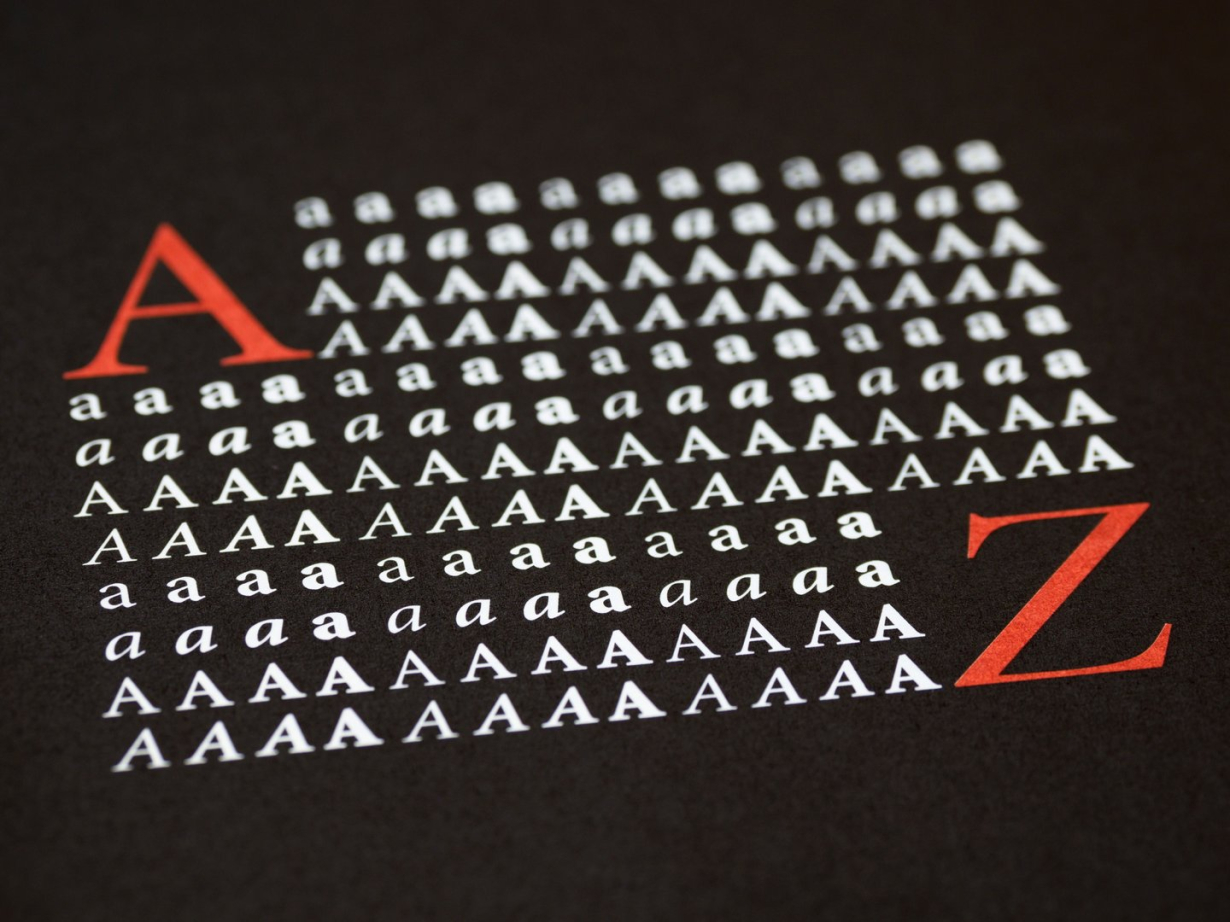
Experimental typography changes familiar letterforms through distortion, overlap, scale, spacing, or unexpected arrangements. It gives you ways to make a message feel playful, awkward, urgent, or unfamiliar. Check whether those changes help readers understand your message.
Start with one headline and one intended setting. Make a plain reference version, change a deliberate feature, and compare the results at their final size. Ask someone who hasn't seen the design to read it without an explanation. Keep the versions that communicate, then work on the details that caused hesitation.
This guide combines published trend reports, reading research, and web accessibility guidance with a suggested design review process. The poster example and test procedure are illustrative. They aren't results from a usability study conducted for this article. Sources were checked on October 15, 2026.
Key takeaways
Give each experiment a specific job, such as making an event name feel energetic while keeping its date easy to find.
Treat trend reports as sources of ideas. Their forecasts and platform searches don't establish how every audience reads.
Compare versions with the same wording, layout, and output conditions so you can identify what changed.
Check the actual words, unfamiliar readers, production files, and digital behavior before approving a design.
Keep a simpler version for contexts where the expressive treatment stops working.
Give experimental typography a job
A distorted headline can be a good answer to a clear brief. It becomes difficult to evaluate when the brief amounts to “make the type interesting.” Interesting to whom, and for what purpose? A music event, a museum label, and a checkout screen ask different things of their lettering.
Write a sentence describing the effect you want. For a hypothetical evening exhibition, it might be: “The title should feel unsettled, while visitors can still identify the event and find the opening time.” That sentence gives you two things to inspect. You can discuss the feeling of the headline and separately check whether the practical information survives.
Choose where the experiment lives. An expressive wordmark doesn't require expressive ticket prices, directions, and opening hours. Give readers some stable text around the unusual letterforms. Our poster typography hierarchy guide can help you decide which information needs the clearest route through the page.
Recognizing a word and reading a passage comfortably are different tasks. A headline might reward a brief pause. A paragraph of instructions has a different job. Decide how much effort the reader can reasonably spend in that setting before applying the same treatment across an entire design system.
Read the 2026 trend signals carefully
The Adobe Express design trends article for 2026, published December 12, 2025, includes exaggerated lettering among its predictions. It describes large sans-serif forms, rounded and distorted shapes, and handwritten approaches. That's a direction to explore, rather than evidence that an expressive headline will outperform a restrained one.
Canva's 2026 design trends report contains both quieter editorial styling and louder, handmade design. Its Mexico-focused Zinegeist section reports a 77% year-over-year rise in searches related to bold type and DIY layouts across its community. The group includes several search terms; the report doesn't establish a separate 77% increase for each term.
These sources describe different signals. Adobe offers a forecast. Canva combines visual forecasting with information about activity on its own platform. Neither source measures the legibility of your proposed design or establishes that the whole industry has adopted one typographic style.
Use the reports to choose a direction worth sketching. Then return to your own brief. If the client needs a menu that people can scan quickly, a trend toward distorted lettering doesn't answer whether the prices and dish names are easy to read. Keep that decision tied to the actual menu.
Change one feature before combining effects
Begin with a plain version of the same message. Keep the source wording, supporting information, and approximate composition available for comparison. You can return to it whenever an exciting sketch becomes hard to judge.
An initial experiment might alter spacing, width, alignment, or a particular glyph. Choose one. If you stretch the letters, overlap them, rotate the line, and change the background together, you'll have trouble explaining which decision helped and which caused the problem.
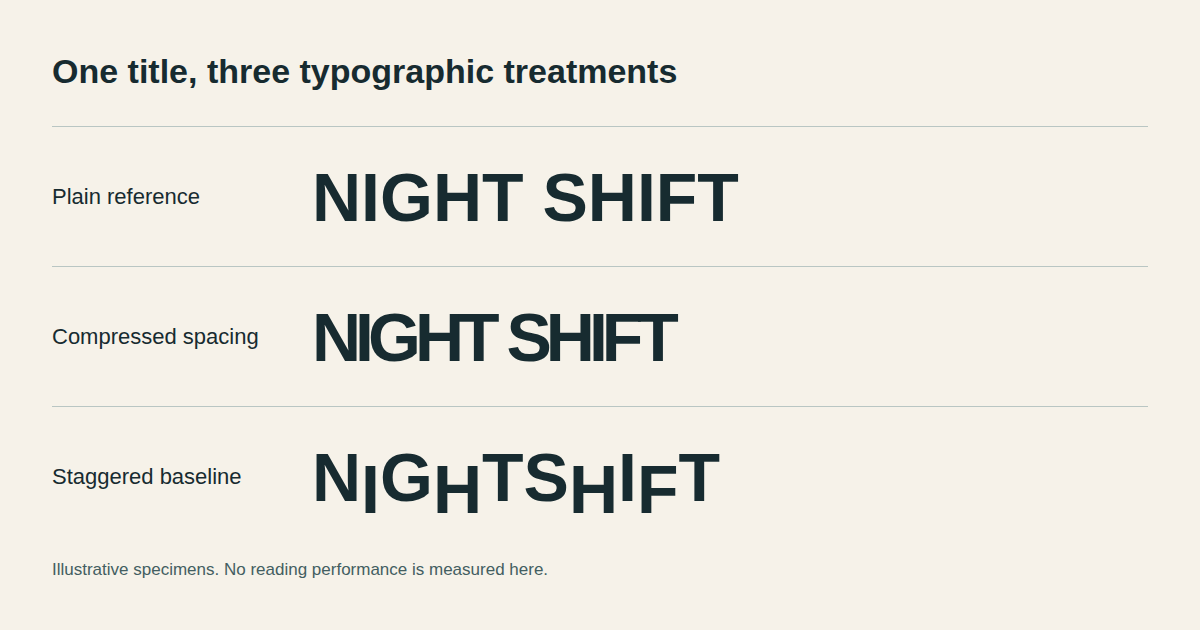
Illustrative specimens use the same event name. They demonstrate design choices, not measured legibility results.
Spacing and overlap
Push the spacing until the relationship between adjacent letters becomes noticeable. Inspect what happens to word boundaries and to pairs whose shapes already resemble another character. Keep the unmodified version beside the experiment while making those judgments.
With overlap, ask which part of each letter carries its identity. A shared stroke might create a pleasing connection, yet it might also remove the detail a reader needs. Try the longest real word in the project before developing a whole alphabet around a successful short word.
Width and variable type
A variable font gives you another way to explore proportions. The MDN variable fonts guide explains registered axes such as weight, width, slant, italic, and optical size. Individual fonts expose different axes and ranges, so inspect the font you're using before planning the treatment.
Changing an available width axis uses the variations designed into that font. Stretching an outlined word in a drawing application is a separate operation. Compare their results rather than assuming they'll produce equivalent letterforms. Our variable fonts guide for graphic designers offers related options to investigate.
Baseline and scale
A staggered baseline or oversized character can give a headline movement without changing every glyph. Keep a note of the intended reading order, especially when the arrangement crosses lines. Show the composition without a verbal cue and ask where the reader starts.
Check the surrounding text at the same time. A large expressive letter can pull attention away from the date or make the next line look like a separate message. Move or simplify a supporting element before adding another effect to repair the hierarchy.
Use reading research without promising a magic font
Personal preference is useful feedback, but it doesn't tell you everything about reading performance. In Towards Individuated Reading Experiences, published in ACM Transactions on Computer-Human Interaction in March 2022, the researchers examined font preference and reading effectiveness across multiple studies.
The paper reports a 35% reading-speed difference when comparing participants' fastest and slowest fonts, without a corresponding loss of comprehension in that comparison. Its main study used data from 352 adults after filtering. The work concerns reading passages and individual differences, rather than experimental display lettering on posters.
Ask separately whether someone likes the lettering and whether they can read it comfortably. The study doesn't promise a 35% improvement from changing your brand font, and it doesn't identify a universal winner for your audience. A preference vote and a reading task answer different questions.
For a design review, ask both. Let someone tell you how the headline feels after they've read it. Record their reading first so the discussion about taste doesn't influence the observation. You can respect a preferred version while still repairing a letter that several readers confuse.
Build a repeatable legibility test
The following procedure is a practical review method you can adapt to the project. It doesn't have a universal pass score or a scientifically established sample size. Its purpose is to expose specific problems before approval and make each revision easier to explain.
Prepare the real content and output conditions
Use the event name, product name, or headline that will actually ship. Include awkward letter pairs, numerals, punctuation, and any accents the project requires. A sample that works for “ART” hasn't established that it works for a long exhibition title or a multilingual campaign.
Make a list of the intended outputs. A printed poster, phone announcement, packaging label, and presentation slide can require separate versions. Export each at its intended dimensions. Review print at a meaningful distance and digital work on the devices people will use, rather than relying on a large design canvas.
Include a plain reference and give each experimental version a neutral label. Avoid names such as “premium version” or “boring version,” which tell a reviewer how you expect them to respond. Keep the presentation conditions consistent enough that your notes remain useful.
Ask for a cold reading
Show one version to someone who hasn't watched you build it. Ask, “What does this say?” Give them time to answer without tracing the letters or supplying the first word. Write down the response, including any hesitation or incorrect reading.
Then ask a practical question appropriate to the design: when does the event begin, where is it, or which item costs the displayed amount? A successful reading of the decorative headline doesn't establish that the page communicates its supporting information.
If the person becomes familiar with the message, later versions are no longer equally unfamiliar. Change the presentation order across reviewers or use another realistic phrase where possible. Treat the observations as design feedback, and acknowledge where familiarity makes comparison difficult.
Record what happened before interpreting it
Separate the observation from the explanation. “Read the second word as NIGHT” is an observation. “The overlap probably hides the opening stroke” is a hypothesis. Keeping both lets you make a targeted revision instead of declaring that the whole style failed.
Avoid turning a small informal review into a claim about all readers. Include people who resemble the intended audience where you can, and seek feedback from readers with relevant access needs. Record who the review didn't include so that a tidy spreadsheet doesn't suggest broader evidence than you collected.
Review condition | What to record | A useful next action |
|---|---|---|
Intended display size | Misread letters and lost word boundaries | Adjust the specific spacing or shape |
Real viewing distance | Whether the main message is identifiable | Simplify the treatment or increase its usable size |
Unfamiliar reader | Exact reading, hesitation, and requests for help | Revise the confusing word and try again |
Supporting information | Whether the date, price, or next step is found | Repair hierarchy around the expressive headline |
Final export | Clipping, substitution, and unexpected line breaks | Correct the production file and recheck it |
Check digital accessibility alongside the visual treatment
A readable specimen doesn't establish that the finished web page is accessible. Check how the implementation behaves when people change its presentation. The points below concern web content; a printed poster needs its own production and reading checks.
Contrast applies to the actual text and background
W3C's explanation of WCAG 2.2 contrast requirements specifies a minimum ratio of 4.5:1 for ordinary text and 3:1 for large text at Level AA, with defined exceptions. Large text means at least 18 points, or 14 points when bold; a headline doesn't qualify simply because it feels visually prominent.
Measure the colors used in the implementation. Over photography, check the areas behind the letters that people must read. Thin strokes also deserve visual inspection even when the underlying color values meet the numerical threshold. Contrast alone doesn't establish that a heavily distorted word is legible.
Let readers change text spacing
WCAG 2.2's text spacing criterion requires supported markup content to retain information and functionality when specified spacing overrides are applied together. Those settings are line height of 1.5 times the font size, paragraph spacing of twice the font size, letter spacing of 0.12 times the font size, and word spacing of 0.16 times the font size.
These are override-test values, rather than required default styling. Ask the developer to apply them and inspect the result. A headline fitted tightly into a fixed-height container needs particular attention if increased spacing causes clipping or covers the text below it. The criterion includes an exception for languages and scripts that don't use particular spacing properties.
Preserve useful text behavior
W3C's images of text guidance favors text when the same presentation can be achieved with the available technology, while recognizing customizable and essential-presentation exceptions. Logotypes are treated as essential in that criterion. A decorative headline shouldn't automatically become a flat image just because exporting one is convenient.
Discuss the implementation with the developer before finalizing the design. Establish what remains live text, how meaningful artwork receives an appropriate text alternative, and where the essential practical information appears. Readers still need the message when the artwork isn't available to them.
Check small layouts and zoom as well. The WCAG reflow explanation uses a width equivalent to 320 CSS pixels for vertically scrolling content, with exceptions for content that needs a two-dimensional layout. Test the complete page for lost information and unnecessary scrolling in two directions. This is one check within accessibility review, rather than a complete conformance assessment.
Work through an experimental typography poster example
Imagine a small gallery exhibition called “Night Shift.” The brief asks for a restless headline, a clearly identifiable date, and an address that visitors can find quickly. This is a hypothetical project used to show the decisions; no reader results are being claimed.
Start with a reference poster containing all three pieces of information. Set the title plainly, then establish a supporting text style and the intended print size. Save that version. It gives you somewhere useful to return if the lettering experiments begin to obscure the event details.
In version A, compress the title using a suitable font width variation. In version B, stagger selected letters along the baseline. In version C, overlap one pair while leaving the rest alone. Keep the date and address consistent during this initial comparison.
Now inspect “Night” and “Shift” separately. Does the overlap change how a particular pair reads? Does the staggered line suggest the wrong reading order? Does the narrowed word still hold together at the social-post size? Those questions point toward concrete revisions instead of a general argument about which design looks more creative.
If a version makes the event name distinctive but interrupts the date, move the date into a calmer area and test the whole composition again. If repairing the overlap removes the effect you wanted, keep that experiment as artwork and choose another title treatment. You don't need to force every promising sketch into the final identity.
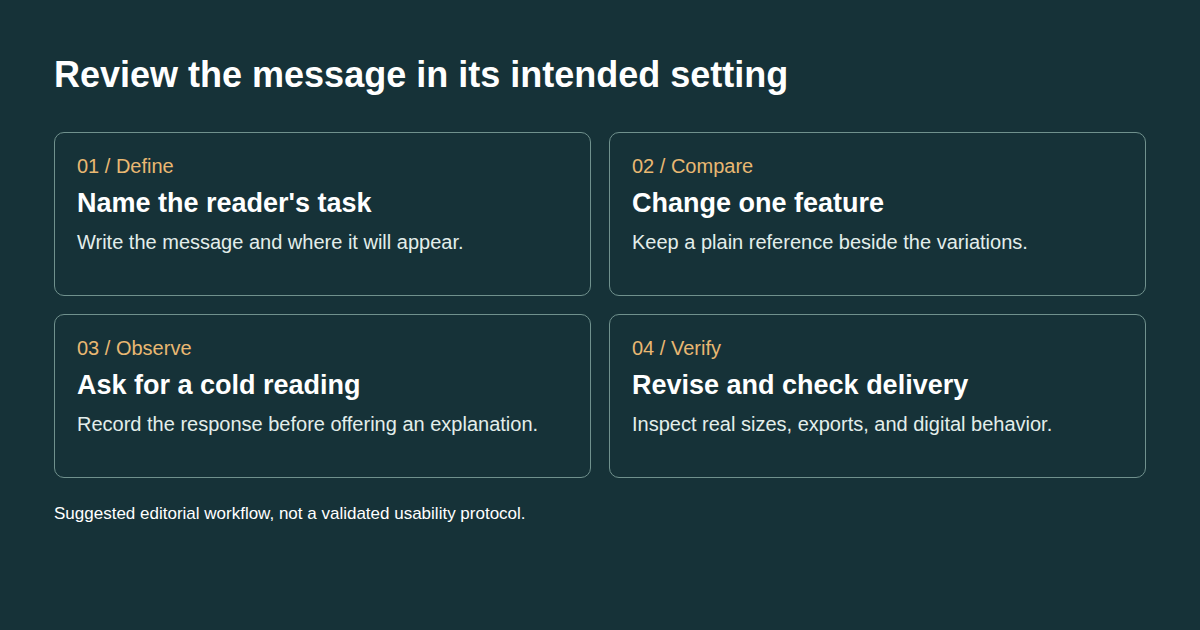
This sequence is a suggested working method. Reader observations should determine which revision comes next.
For the web announcement, adapt the chosen approach to the available space and check the implementation. Keep the source files and observations with the approved output. The guide to common typography mistakes offers another review of spacing and hierarchy when you need to diagnose a specific problem.
Prepare a handoff that survives production
Approval should identify which version was approved and where it can be used. A presentation image alone doesn't explain how to reuse the design. Supply the final artwork, the editable source, and notes about contexts that require a simpler treatment.
Include the text exactly as it should appear. List required accents, punctuation, numerals, and alternate lockups. If a future campaign needs a longer headline, the next designer should know which decisions are flexible and which shapes were drawn for a particular word.
Check the font license for the planned uses and any restrictions on sharing font files. Keep those decisions with the project rather than assuming that permission for a desktop mockup also covers every distribution method. Our font management guide can help organize the working files, but the relevant license is the source for permissions.
Open the exported files outside the design application. Inspect the actual print proof or deployed page when it becomes available. Look for substituted fonts, clipped accents, unexpected line breaks, and thin details that no longer appear as intended. A clean source file is only part of the delivery.
Questions to settle before approval
How experimental can the lettering become?
Set the limit by the job of the text and what your review reveals. A decorative specimen can tolerate ambiguity that an address cannot. If an important word needs repeated explanation, simplify the letters or give readers a clear equivalent in the surrounding design.
Can expressive type work in a small layout?
Test a separate small version using the real wording. Remove details that stop contributing at that size and preserve the intended reading order. You can retain the character of a design without keeping every overlap or distortion from its largest application.
How many reviewers are enough?
This suggested design check has no fixed validated number. More relevant perspectives can expose different problems, but a handful of comments won't establish population-wide performance. Match the review effort to the project's audience and consequences, and describe what you actually checked.
When should an experiment stop?
Stop refining a treatment when it repeatedly breaks the message it was meant to carry, or when another version meets the brief more clearly. Save the unsuccessful sketch with a short explanation. It can still be useful for another context, even if it isn't right for this headline.
Pick one live project and make a plain reference version before the next experiment. Keep the wording, output conditions, and reader observations together. Write an approval note that tells the next person which version to use and what to preserve.
Tags
Linh Nguyen
Graphic Designer
Passionate Graphic Designer | Specializing in Illustration Design | Bringing Captivating Visuals to Life